
Browse & search
Property archive
Browse URLs, the three views, every filter and sort option, and how to configure them.
The three views
/properties/ is the browse page. It renders in one of three views, each with its own URL:
| View | URL | Best for |
|---|---|---|
| Grid | /properties/ | Photo-led browsing, the default |
| Rows | /properties/rows/ | Scanning many listings with their specs |
| Map | /properties/map/ | Location-led search — see Map view |
Visitors switch with the view toggle in the filter bar. Pagination keeps the view: /properties/map/page/2/.
Taxonomy archives accept the same segments, so /property-location/london/map/ is a map of London listings with the filter bar intact.
These routes need pretty permalinks. If a view 404s, go to Settings → Permalinks and press Save Changes once.
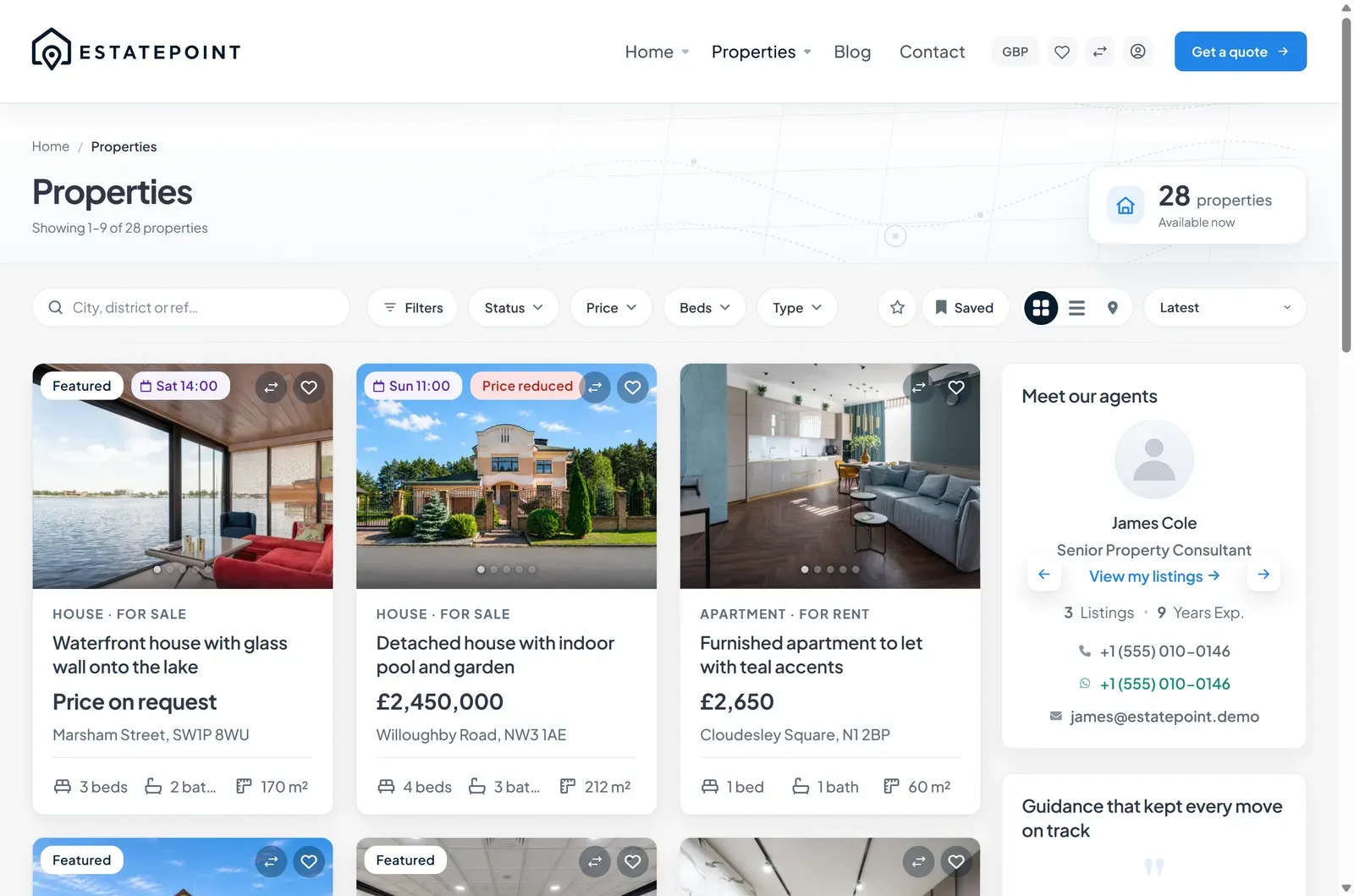
Filter bar
The chip row across the top of the archive:
Filters · Category · Status · Price · Beds · Type · Location · Featured · Open house
Filters opens the full drawer, which adds everything else:
| Filter | Filters on |
|---|---|
| Category, Property type, Status, Location | The matching taxonomy |
| Price range — Min price, Max price, Currency | Price, converted to the base currency so mixed-currency listings compare correctly |
| Bedrooms, Bathrooms, Floors | Listing counts, as at least |
| Interior area (m²) — Min / Max | Interior area |
| Lot size (m²) — Min / Max | Lot size |
| Year built — Min year / Max year | Construction year |
| Parking spaces | Any, 1+, 2+, 3+ |
| Furnished, Pets allowed | The matching listing flags |
| Featured only | Listings carrying the Featured label |
| Open house | Listings with an active open-house schedule |
| Features | Amenity terms — all selected must match |
Chips only offer terms that have listings, so the bar never shows an empty result.
Sorting
| Label | Order |
|---|---|
| Latest | Newest first — the default |
| Price: Low to High | Ascending, normalized across currencies |
| Price: High to Low | Descending |
| Title: A–Z | Alphabetical |
Shareable filter URLs
Filters live in the query string, so any filtered view can be linked or bookmarked:
/properties/?listing_type=for-rent&beds_min=2&sort=price_asc
/properties/map/?property_location=lisbon&price_max=750000
/properties/rows/?property_feature[]=sea-view&property_feature[]=pool
Useful query parameters:
| Parameter | Values |
|---|---|
sq | Free-text search |
property_cat, property_type, listing_type, property_location | Term slug |
property_feature[] | Term slug, repeatable |
price_min, price_max, price_currency | Whole numbers plus an ISO currency code |
beds_min, baths_min, floors_min, parking_min | Whole numbers |
area_sqm_min / area_sqm_max, lot_sqm_min / lot_sqm_max | Numbers |
year_built_min, year_built_max | Years |
furnished, pets_allowed, featured_only, open_house_only | 1 |
sort | newest, price_asc, price_desc, title |
paged | Page number |
Build a “Rentals under €2,000 in Lisbon” menu item by copying the URL out of the browser after filtering.
Configuring the archive
Theme Options
Theme Options → General → Property archive browse sets Listings per page (3–24).
The archive template
Everything else is in the Elementor template bound to the property archive. Open it from Theme Options → Property → Property archive template → Edit in Elementor.
The Archive — Property widget is the whole browse experience in one block and exposes:
- Card style and grid columns, responsive
- Listings per page — overrides the Theme Options value for this template
- Which chrome shows: quick search, filter bar, sort control, view toggle, saved searches
- Results heading, pagination labels, and empty-state copy
- Image zoom and card lift on hover
A property archive template stacks three blocks — Archive — Property Hero, Archive — Property Search & Filters, Archive — Property Browse Results — so you can put the hero and filters full-width and results in a column beside sidebar widgets.
Sidebar
Add EstatePoint Sidebar widgets — listings, team, testimonials, CTA, contact, office map — to the sidebar column of the archive template. The layout preset (Left sidebar, Full width, Right sidebar) and Sticky sidebar are on the binding card in Theme Options → Property.