
Listings
Pricing & currencies
Per-listing prices, the base currency, exchange rates, and the visitor currency switcher.
Each listing has its own currency
A listing stores a Price and a Currency. A Lisbon apartment can be priced in euros while a London flat is in pounds, on the same site.
To compare across currencies — price filters, price sorting — the site converts every price into one base currency behind the scenes and compares those normalized values. You never see that number; it exists so Price: Low to High is correct on a mixed-currency archive.
Price on request
Turn on Price on request in the listing editor and the front end shows Price on request instead of the number, everywhere the price would appear.
The same text appears automatically when the price is empty or zero, so an unfinished draft never publishes a €0 listing.
Set the base currency and rates
EstatePoint → Theme Options → Currency & FX:
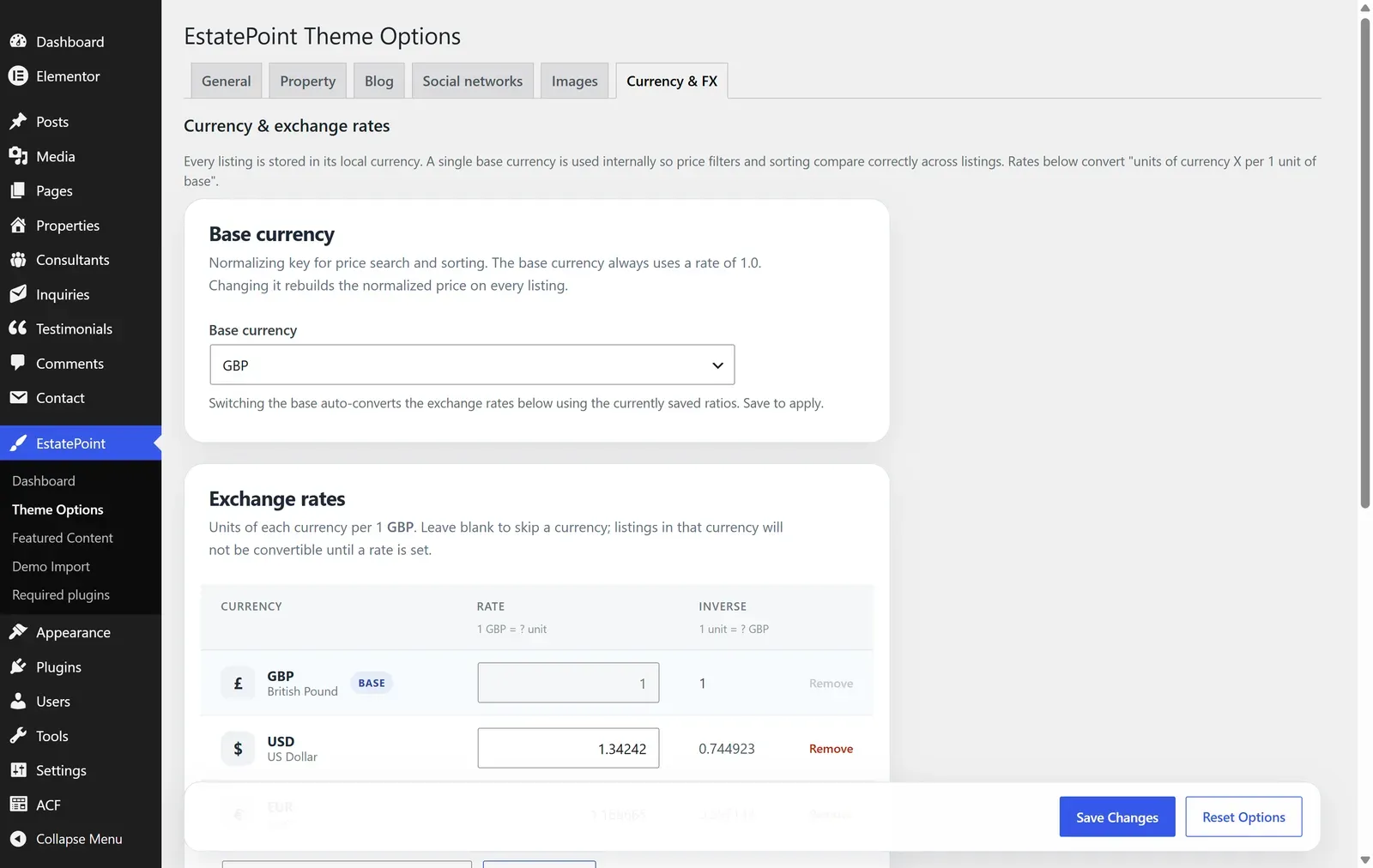
| Card | What to do |
|---|---|
| Base currency | Pick the currency your business thinks in. Changing it later re-normalizes existing listings |
| Exchange rates | One row per active currency, expressed as units of that currency per 1 base unit, with the inverse shown beside it |
| Cross-rates matrix | Read-only grid to sanity-check the rates you entered |
| Automatic updates | Last successful sync, next scheduled run, last error, and Refresh rates now |
Add currency adds a currency to the active list — that list is what the Currency dropdown in the listing editor offers. USD, EUR, and GBP are active by default, from a catalog of around forty codes; adding one fetches its live rate straight away.
Rates sync daily. If your host blocks outbound HTTP the sync fails silently apart from the Last error line, and manual rates keep working.
Exchange rates affect display conversions and filtering, not your listings. The stored price and currency are never rewritten.
Visitor currency switcher
Visitors can browse in their own currency. Add the switcher with the shortcode:
[estatepoint_currency_switcher]It renders as pills, a select, or a symbol chip. The choice is remembered in a cookie for 30 days.
When the display currency differs from a listing’s own currency, the converted price is shown with a note that it is an approximate conversion from the original — so nobody mistakes a converted figure for the asking price.
The archive price filter can carry its own currency, so a visitor filtering “under 500,000 EUR” gets the right listings even when those listings are priced in pounds.
How prices are formatted
Formatting follows the currency: symbol placement, thousands separators, and decimals. There is no per-listing prefix, suffix, or per-square-metre price field — keep price a clean number and put terms like plus VAT in the description.
Checklist for a mixed-currency site
- Set Base currency before importing listings.
- Add every currency you sell in under Exchange rates.
- Confirm the daily sync succeeded, or enter rates manually.
- Place the currency switcher in the header or footer template if visitors need it.
- Test the archive Price filter with a min and max in a non-base currency.