
Agency tools
Inquiries
Where leads land, how the pipeline works, email routing, spam protection, and retention.
How a lead arrives
A visitor submits the inquiry form on a listing page — the Property Inquiry Form block, or the combined Property Contact & Enquiry card. Two things happen:
- The inquiry is stored in WordPress under Inquiries → Inbox.
- An email is sent to the address resolved for that listing.
Nothing depends on a third-party form plugin, and nothing is stored off-site.
The inbox
Inquiries → Inbox lists leads with Lead, Status, and Received columns, and counters across the top: Total leads, Unread, Open, Handled, Trash.
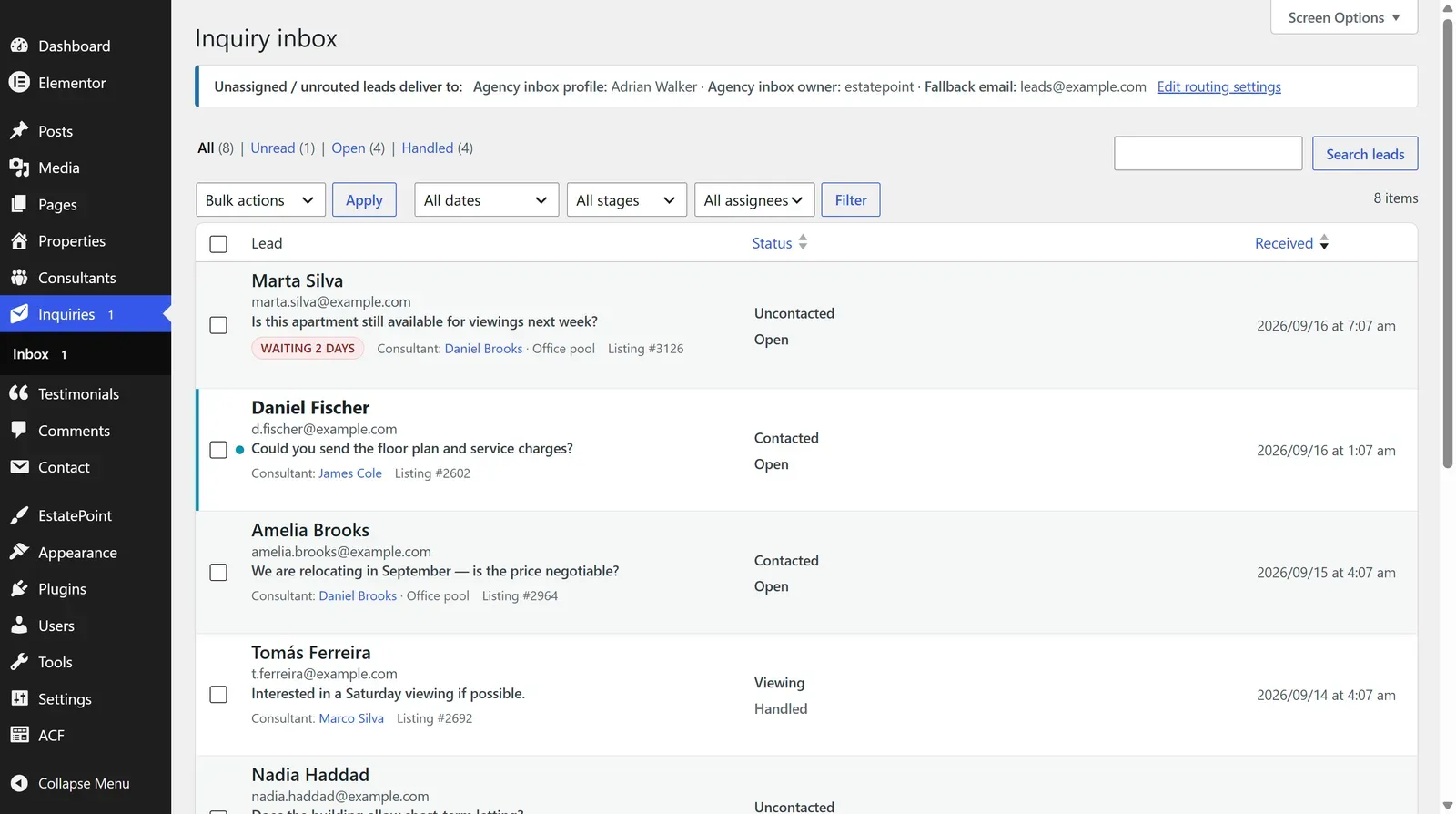
Opening a lead shows Lead details — the sender’s name, email, phone, message, and the listing they asked about.
Pipeline stages
Each lead carries a stage you set as you work it:
Uncontacted → Contacted → Qualified → Viewing → Won / Lost
Won and Lost are terminal. Separately, a lead is either Open or Handled — the handled marker records that follow-up is complete, and does not email anyone.
Under every lead there is a follow-up log: anyone who can open the lead writes down what happened, and each note keeps who wrote it and when. Nothing is overwritten, and the log is the same in wp-admin and in the agent panel. A lead that has been open for more than a day with nothing recorded against it carries a Waiting mark in both lists until someone acts on it. Notes are internal — they are never sent to the visitor.
Where the email goes
The recipient is resolved per listing, first match wins:
- The assigned consultant’s Office inbox email
- The assigned consultant’s Profile email
- The agency inbox configured in settings
- The fallback address
- The WordPress admin email
Set the last two under Settings → General → Listing inquiry routing (agency inbox):
| Setting | Purpose |
|---|---|
| Listing inquiry fallback email | Catch-all when no consultant is assigned |
| Agency inbox (consultant profile) | A consultant profile acting as the house inbox |
| Agency inbox owner (User) | The user account that owns unassigned leads |
The email subject is Listing inquiry: {property title}, and the body carries the listing, its URL, and the sender’s name, email, phone, and message.
Test this before launch. Submit a real inquiry on a live listing and confirm delivery. If nothing arrives, WordPress mail is the usual culprit — install an SMTP plugin and send through a real mail service. Shared hosting
mail()is frequently blocked or filed as spam.
Spam protection
Three layers, no CAPTCHA in the visitor’s way:
- A hidden honeypot field bots fill in and humans never see
- A per-IP rate limit of five submissions per minute
- A security token on every submission
If you need more — a spam wave, a scraped form URL — a developer can attach a challenge such as Turnstile through the provided hook. See Developer reference.
Retention and privacy
Settings → General → Inquiry retention (months) sets how long leads are kept; a daily job trashes older ones. Inquiries are also included in WordPress’s personal-data export, so a subject access request returns them with everything else.
Leads contain personal data. Decide a retention period deliberately, and mention inquiries in your privacy policy.
Who sees which leads
- Administrators and editors see every lead.
- Property agents see leads for their own listings, in wp-admin or the front-end dashboard.
See Agent dashboard for the agent-side inbox, including stage changes and trashing from the front end.
Troubleshooting
| Symptom | Check |
|---|---|
| No email, but the lead is in the inbox | WordPress mail delivery — use SMTP |
| Neither email nor stored lead | Browser console on the listing page; a JavaScript error or an aggressive security plugin blocking the request |
| Leads go to the wrong person | The listing’s Assigned consultant, then that consultant’s Office inbox email |
| Too many requests | The rate limit — expected while testing repeatedly; wait a minute |