
Browse & search
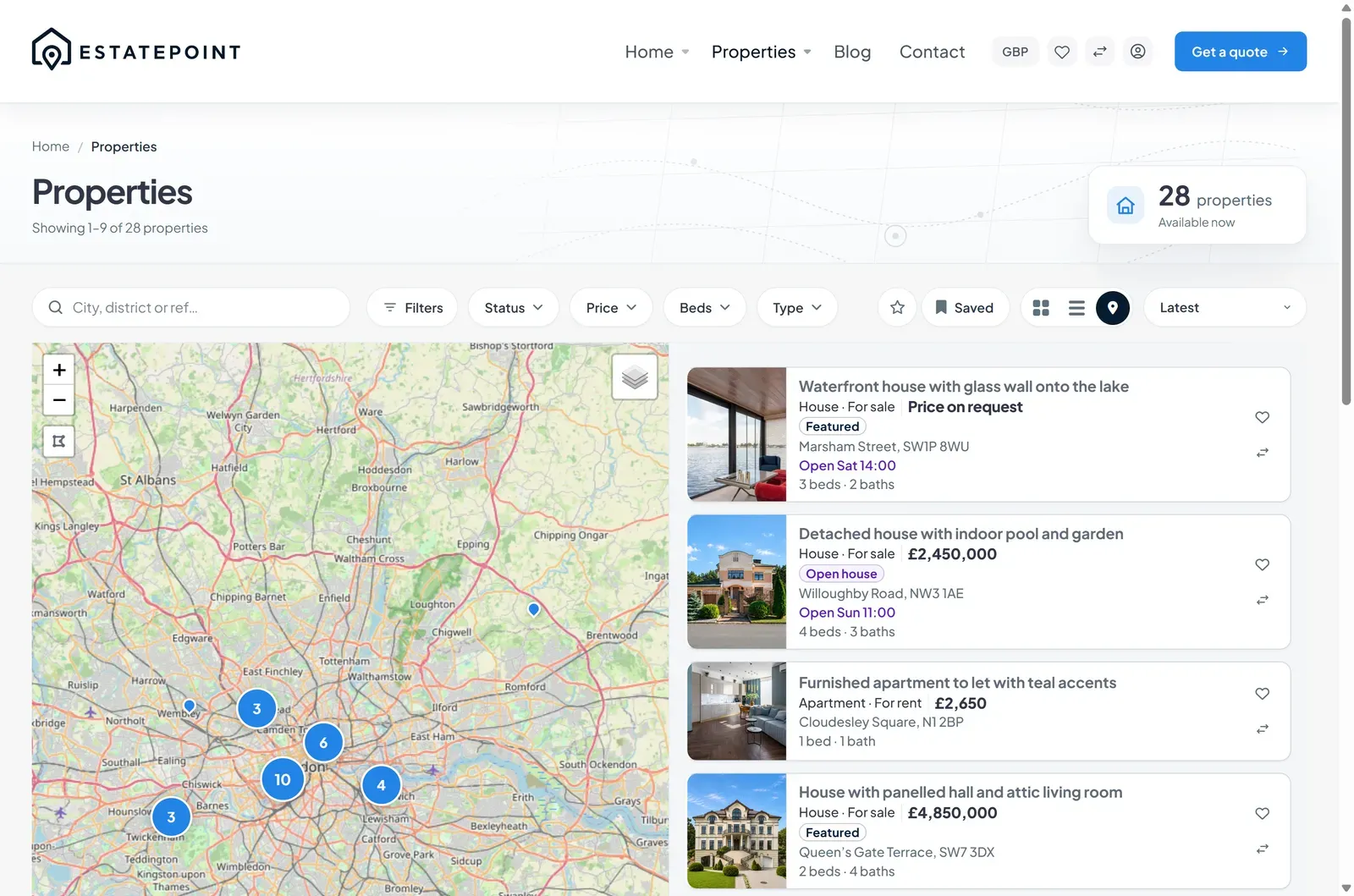
Map view
Split map browsing, pin cards, clustering, draw-a-boundary search, and the homepage map hero.
No API key needed
The map uses Leaflet with OpenStreetMap tiles and an optional satellite basemap. Visitors switch with the Map / Satellite control. Neither provider requires an account, a key, or a billing card.
Where the map appears
| Surface | URL / block |
|---|---|
| Property archive map view | /properties/map/ |
| Taxonomy map view | /property-location/lisbon/map/, and any other term archive |
| Homepage | The Hero Map widget |
| Listing page | The Property Address & Map block |
| Contact / about pages | The Office Map widget |
Listings need coordinates
A pin exists only when the listing has latitude and longitude. Set them in the listing editor under Listing details → Address & map: search for the address, then drag the marker to the exact spot.
Listings without coordinates still appear in grid and rows views — they are simply absent from the map. Auditing this before launch is worth the five minutes.
What visitors can do
Pins and clusters. Nearby listings group into a numbered cluster; zoom in and they separate. At close zoom, pins can become price bubbles so the market reads at a glance.
Pin cards. Clicking a pin opens a card with the photo, label chip, title, price, beds/baths/area, address, open-house line when there is one, the consultant’s name, a Save to favorites heart, and a link to the listing.
Draw a boundary. The Draw tool lets a visitor trace an area on the map; Finish applies it, Remove boundary clears it. The shape is kept in the URL, so a hand-drawn search area survives a filter change and can be shared.
Filters still apply. Everything from the filter bar narrows the map at the same time, and the map fits its bounds to the results.
Default center and zoom
New sites with no listings need a sensible starting position. The default center and zoom are set in code and can be changed from a child theme:
add_filter( 'astora_property_map_default_center', function () {
    return array( 41.0082, 28.9784 ); // lat, lng
} );

add_filter( 'estatepoint_property_map_default_zoom', function () {
    return 11;
} );
Once results exist the map fits to them, so this only matters for an empty or unfiltered first paint.
Homepage map hero
The Hero Map widget puts the same map at the top of the front page with a search bar over it. It is the strongest choice when your visitors think in neighborhoods rather than keywords, and the heaviest hero — pick it deliberately, not by default.
Performance
The map loads its dataset in a single request and caps how many markers it returns, so a site with thousands of listings stays responsive. Visitors narrow with filters rather than by rendering everything at once.
Troubleshooting
| Symptom | Likely cause |
|---|---|
| Map area is blank or grey | Tile requests blocked — check the browser console and any firewall or ad-blocking layer |
| Listings missing from the map | Those listings have no coordinates |
| Map view URL 404s | Permalinks not flushed — Settings → Permalinks → Save Changes |
| Pins in the wrong place | The marker was left on the geocoded guess instead of being dragged to the property |
| Map is squashed inside a tab or accordion | It was initialized while hidden; give the container an explicit height |